
Download Dreamlike – Free AI Art Generator, Secure & Fast Creation Tool
Overview of Dreamlike
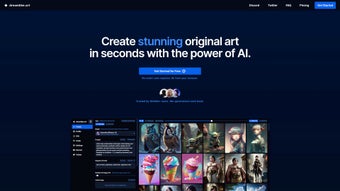
Dreamlike, built by Dreamlike Tech Ltd., is a cutting‑edge, browser‑based AI art generator that lets anyone turn a simple text prompt or an existing image into a high‑quality visual masterpiece in seconds. The platform runs entirely on cloud‑hosted diffusion models, which means the heavy computational work is performed on secure servers while the user interacts through a clean, responsive web interface. Because there is no client‑side installation, Dreamlike works on any modern browser—Chrome, Edge, Safari, or Firefox—on Windows, macOS, Linux, Android, or iOS. The service is genuinely free: there are no hidden subscription fees, no credit‑card requirements, and the free tier includes unlimited text‑to‑image generation, upscaling, face‑fix, and community participation. For creators, this translates into a low‑friction workflow where you can sketch a concept, refine it with image‑to‑image tools, upscale the result for print‑ready quality, and even animate short loops—all without leaving the browser. Whether you are a graphic designer needing rapid mock‑ups, a social media manager looking for eye‑catching visuals, or an art hobbyist eager to explore AI‑driven creativity, Dreamlike offers a versatile, secure, and instantly accessible toolbox. Its vibrant community hub adds a social layer, encouraging users to join challenges, earn badges, and showcase their work, which helps keep the creative momentum alive long after the first experiment.Key Features and Tools
- Text‑to‑Image Generation: Convert descriptive prompts into detailed artwork using state‑of‑the‑art diffusion models.
- Image‑to‑Image Transformation: Upload a base picture and let the AI reinterpret style, lighting, or composition.
- AI Upscaling & Face Fix: Boost resolution up to 4× and automatically correct facial imperfections for portrait‑grade results.
- Photorealistic Diffusion: Produce lifelike renders suitable for product mock‑ups, architectural visualisation, or advertising.
- Modern Animation Diffusion: Generate short, looping animations from static inputs, perfect for social media stories.
- Community Challenges: Participate in themed contests, earn badges, and discover trending techniques from peers.
- Personal Gallery & Content Management: Store, organise, and share creations directly from the browser without external storage.
- Zero‑Cost Access: Completely free with no hidden fees, subscription traps, or usage‑based charges.
- Secure, No‑Credit‑Card Required: All processing occurs over encrypted HTTPS; privacy‑first design ensures data is not retained longer than necessary.
Each feature is designed to be discoverable within a few clicks. The text‑to‑image panel offers preset styles such as “Illustration”, “Concept Art”, and “Photorealistic”, while advanced users can tweak the guidance scale, number of diffusion steps, and random seed to steer the generation process. The image‑to‑image workflow includes a drag‑and‑drop zone that instantly previews how the AI will reinterpret the source material, allowing rapid iteration.
Upscaling and face‑fix tools are powered by dedicated super‑resolution models that maintain colour fidelity and fine detail, eliminating the need for third‑party editors. The animation diffusion module creates 2‑5 second loops that can be exported as GIF or MP4, expanding the utility of static creations for modern digital marketing. Community challenges rotate weekly, providing fresh prompts and a leaderboard that fuels friendly competition.
All of these tools are integrated into a single, cohesive UI that feels both professional and approachable, making Dreamlike a one‑stop shop for creators of any skill level.
Installation, Usage & Compatibility
Dreamlike is a pure web application, meaning you can launch it from any modern browser on Windows, macOS, Linux, Android, or iOS. No downloads, no installations, and no system‑level dependencies are required.
Getting Started in Three Simple Steps
- Visit the Official Site: Go to dreamlike.ai and click the “Start Creating” button.
- Create a Free Account (Optional): While anonymous generation is possible, signing up unlocks the personal gallery, challenge participation, and saved preferences.
- Enter Your Prompt: Choose the “Text‑to‑Image” tab, type a descriptive prompt (e.g., “sunset over a cyberpunk city, ultra‑realistic”), select a style or model, and press “Generate”.
Within seconds the AI returns a set of variations. You can refine results by adjusting parameters such as “guidance scale”, “seed”, or “steps”. The interface also offers a drag‑and‑drop zone for image‑to‑image work – simply drop a photo, choose a target style, and let the model re‑imagine it.
For upscaling, click the “Upscale” button next to any generated image; the system will automatically enhance detail while preserving colour fidelity. Because Dreamlike runs on cloud‑based GPUs, performance is consistent across devices. Even on mobile browsers, the UI adapts to touch input, allowing you to sketch prompts with voice dictation or tap‑based style selectors.
All processing occurs securely on Dreamlike’s servers, and the results are delivered over HTTPS, ensuring data privacy.
If you prefer to keep a local copy of your work, the “Download” button provides a high‑resolution PNG or JPEG file instantly. For larger files—such as those produced by the upscaler or animation diffusion—the platform generates a temporary link that becomes available within a few seconds, after which the file is automatically purged from the server to respect privacy. The seamless workflow from prompt entry to final download means you can move from idea to publishable asset in under a minute, a speed that is particularly valuable for tight deadlines in marketing, e‑learning, or rapid prototyping environments.
Pros and Cons
Pros
- Completely free with no credit‑card requirement.
- Browser‑based, works on every major OS and device.
- Fast generation – most images appear in under 10 seconds.
- Rich toolset: text‑to‑image, image‑to‑image, upscaling, face fix, animation.
- Active community and regular challenges keep creativity flowing.
- Secure, encrypted connections protect user data.
- No software updates to manage; improvements are deployed server‑side.
- Export options include PNG, JPEG, GIF, and MP4 for diverse workflows.
Cons
- Advanced controls (e.g., custom model tweaking) are limited compared to desktop‑only solutions.
- High‑resolution downloads may require a short wait as the server renders the final file.
- Free tier imposes a daily generation quota during peak traffic.
- No native desktop app for offline work.
- Dependence on an internet connection; offline usage is not possible.
- Limited brand‑specific licensing information; enterprises may need a custom agreement.
Overall, the benefits of Dreamlike far outweigh its drawbacks for most individual creators and small teams. The free model, cross‑platform accessibility, and comprehensive feature set create a low‑risk environment to experiment with AI‑driven art. While power users who require deep model customization or offline capabilities may look elsewhere, the platform’s rapid iteration cycle and community‑driven challenges make it an excellent choice for anyone who values speed, security, and a collaborative vibe.
Frequently Asked Questions
Is Dreamlike really free to use?
Yes. Dreamlike offers a 100 % free tier that includes unlimited text‑to‑image generation, upscaling, face‑fix, animation diffusion, and community features. No credit‑card or subscription is required.
Do I need a powerful computer to run Dreamlike?
No. All heavy lifting is performed on Dreamlike’s cloud servers. A modern web browser and a stable internet connection are sufficient.
Can I download the generated images in high resolution?
Yes. After generation you can click the “Download” button to save the image. For ultra‑high resolution, use the built‑in upscaler before downloading; the final file will be delivered via a temporary secure link.
Is my data safe when I upload images for image‑to‑image?
Dreamlike processes uploads over HTTPS and does not retain them longer than necessary to produce the output. Uploaded content is automatically deleted after the session ends unless you explicitly save it to your personal gallery.
Can I use Dreamlike for commercial projects?
Yes. The free license permits commercial use of generated artwork, provided you comply with Dreamlike’s terms of service (e.g., no illegal or hateful content).
Conclusion & Call to Action
Dreamlike delivers a remarkably powerful AI art suite without charging a dime. Its browser‑first design eliminates barriers to entry, while the combination of text‑to‑image, image‑to‑image, upscaling, face‑fix, and animation tools gives creators a versatile playground. The community challenges and gallery management add a social dimension that keeps users engaged long after the first experiment.
If you’re searching for a free, secure, and fast AI art generator that works on any device, Dreamlike should be at the top of your list. Click the button below to launch the app, start generating stunning visuals, and join a growing community of creators.



.png)



